Is Fetchit already installed?
Before installing anything, check the machine. Open Control Panel > Programs > Programs and Features. If Fetchit is listed, uninstall it; that is an outdated version you are replacing. Once Fetchit is uninstalled or was never there, start the installation.
Where to download Fetchit
Fetchit is available internally through Orion. Go to orion.fetchitdata.cloud and sign in with your Schultz Technology email. A code is sent to your inbox to complete the sign in.
Then open the Downloads page.
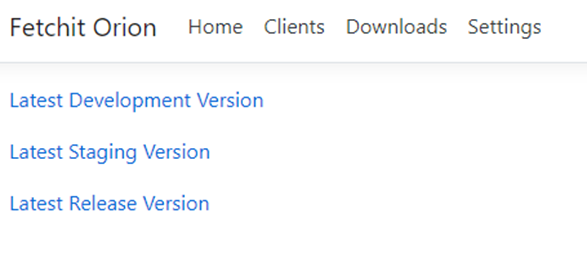
Select the latest release version to download the current installer. Fetchit installers are deployed to the same Wasabi cluster IT uses for data backups.
Understanding the moving parts
Fetchit has three pieces, and which ones you install depends on the clinic.
- Client. The desktop application itself, which shows the popups and the call history.
- Service. Two different things share this name. In our cloud it is the backend: the broker, the backbone that moves call data through the pipeline to clients; the phone system worker, which talks to the provider API (CoreDial, Skyswitch, Ring Central, SIP); and the lookup service, which takes a phone number and checks it against the PMS. On a clinic's server, the Fetchit Service is the background process that syncs data from an on-premises PMS database, or listens to the SIP traffic from a CallerID box.
- Web extension. For Chrome, Firefox and Edge, so Fetchit can open patient records in a cloud PMS.
In the installer, Client means the desktop application and Service means that background service.
Choosing your path
| The clinic runs | Follow |
|---|---|
| AVImark, Cornerstone or Impromed | On-premises PMS |
| A cloud PMS such as ezyVet, Shepherd, Vetspire, Rhapsody, Digitail, VETport or DaySmart | Cloud PMS |
| A CallerID Vertex box, whatever the PMS | CallerID box as well |
| Legacy Fetchit, version 2.718 or below | Upgrading from legacy Fetchit |